Project Details
Project
/
Chatbot RAG
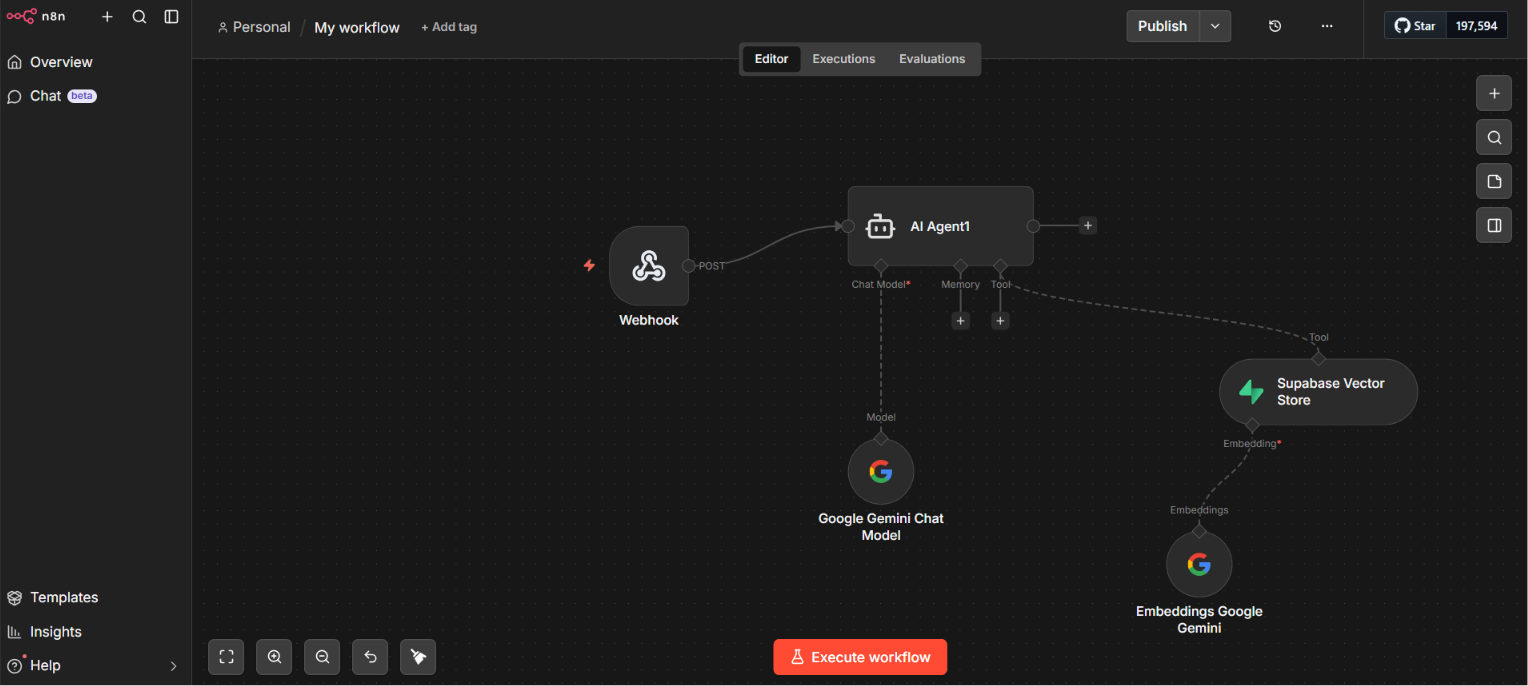
Learn how to build an AI-powered chatbot for your website using n8n, Supabase Vector Database, and RAG (Retrieval-Augmented Generation). This setup allows your chatbot to answer questions using your own documents instead of relying only on AI knowledge.
Why Use RAG?
A standard AI chatbot can provide general answers but doesn’t know your business. By combining RAG with Supabase, the chatbot searches your uploaded documents and returns accurate, context-aware responses.
What You'll Build
- AI chatbot for your website
- n8n automation workflow
- Supabase Vector Database
- RAG document retrieval
- LLM-generated responses
- Easy integration with WordPress or any website
How It Works
- User asks a question.
- Website sends the message to an n8n webhook.
- The question is converted into an embedding.
- Supabase searches for similar documents.
- Relevant content is sent to the AI model.
- The chatbot returns an accurate response.
Benefits
- Answers based on your own data
- Fast and scalable
- No need to retrain AI models
- Easy to update by adding new documents
- Perfect for portfolios, businesses, and support websites
Conclusion
Using n8n, Supabase, and RAG, you can create a powerful AI chatbot that delivers accurate answers from your own knowledge base. It’s an excellent solution for websites that need intelligent, personalized customer support.